By Jeremiah Willett
One of the most critical threats to any BI project is poor data quality. Building beautiful dashboards on top of unverified data is a recipe for disaster. It will inevitably lead to incorrect metrics arriving on an executive’s desk. This will not only severely damage your BI initiative’s credibility but also hurt the business. This is where Qlik Sense’s Data Manager can provide huge value to your organization’s BI project by serving as an early warning system. By automatically profiling your sources, whether they are databases, flat files, or cloud APIs, when imported, Qlik exposes hidden data gaps, anomalies, and formatting issues before the data gets to the visualization. This allows developers to catch and transform data structural issues early.
When you load a table into Qlik, you can preview and profile your data in the Data Manager view. Qlik will automatically show you card views with data distributions, null values, and data types. This instantly answers questions like: Is the Order Date column actually formatted as text? Are customer IDs missing? Let’s take a look at just a few of Qlik’s powerful data profiling features.
Identifying Data Quality Issues
A data quality issue that is particularly important to catch early is corrupted data types. If a field, such as Order_Date, is meant for chronological analysis but is read as a text string, every time-intelligence chart that is built will break. Qlik’s Data Profiler makes this very simple to identify and fix. For example, a text value, Clothing, inadvertently landed in the Order_Date column. We can instantly see that there is an issue with the column because the values are left-aligned, meaning Qlik is treating the column as a text column. We can also easily find the offending value by using the Sort feature to bring the text values to the top. We can then Replace that value with a null and change the data type of the column to a proper Date format.
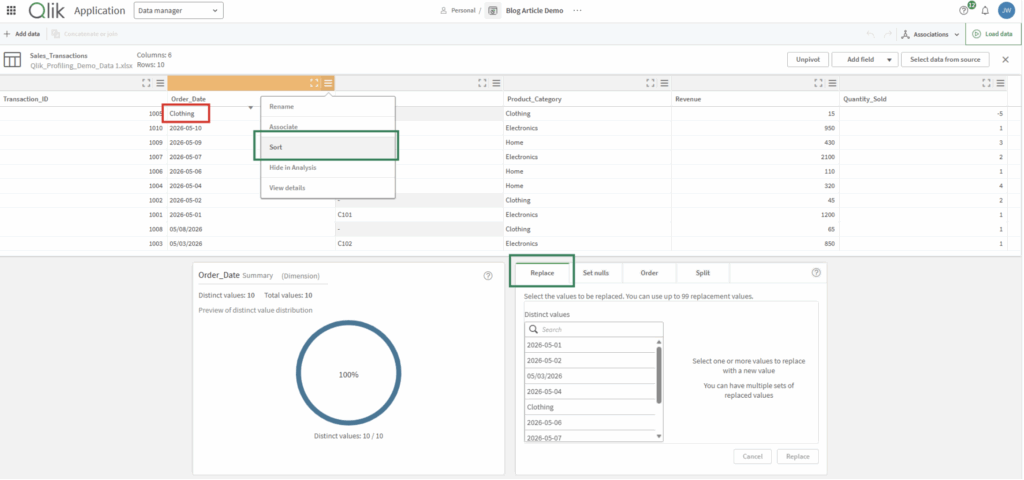
While the data manager is great for one-off fixes, handling hundreds or thousands of anomalies at scale is best managed via bulk replacement expressions or by moving into Qlik’s programmatic Data Load Editor scripting language.
In addition to text replacements, Qlik’s profiling card offers several other built-in transformations to quickly clean your data before it hits the dashboard:
· Set Nulls: Allows you to explicitly mark specific systemic errors or empty strings as proper null values to keep your completeness metrics accurate.
· Order: This lets you customize the default sorting sequence of your data fields, such as defining custom fiscal months or product hierarchies, rather than relying strictly on alphabetical or numeric sorting.
· Split: Gives you the ability to instantly break apart concatenated strings (like separating a full name into distinct “First Name” and “Last Name” columns) using a delimiter of your choice.
Using these visual options keeps your data modeling workflows incredibly fast and code-free.
Spotting Data Completeness Issues
If corrupted data types can sabotage your visualization logic, missing data can be the death nail of your BI project. Imagine an executive requesting a dashboard showing Total Revenue by Customer but a significant number of transactions are missing their Customer_ID. This will completely invalidate the findings of this dashboard. Qlik Sense prevents this from happening by providing instant data completeness profiling. By selecting the Customer_ID column, the profiling engine shifts to display a distinct completeness card view as seen below:
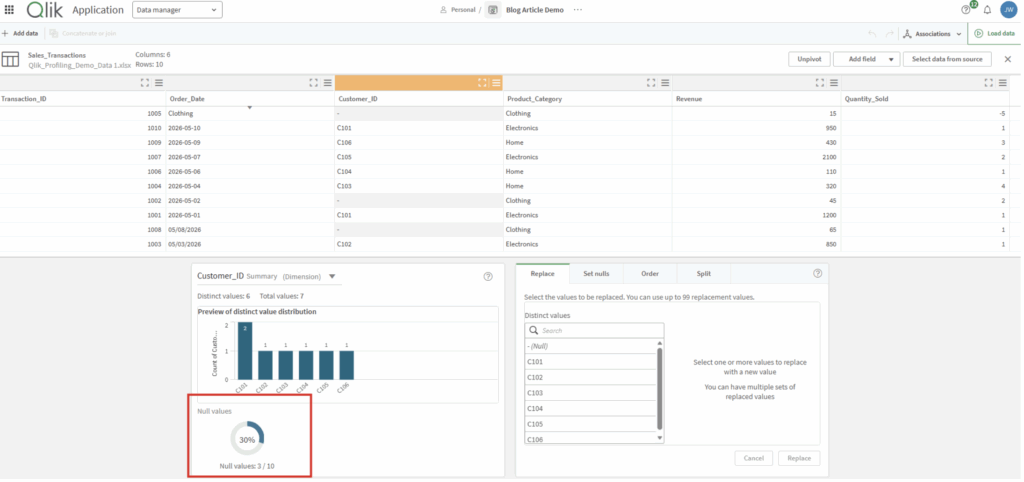
As we can see, 30% of transactions do not have a Customer_ID. This is the exact checkpoint a BI developer needs before building visualizations: Are these missing Customer_IDs a data issue or do they represent a valid business event? By exposing this gap upfront, the developer can address the root cause, long before the dashboard goes to production.
Qlik’s Smart Association Engine
Qlik’s smart association feature allows you to easily join tables together to form a cohesive data model. Qlik Sense bypasses the complexity of manual SQL join statements or manually mapping keys using its associative engine. Rather than making you guess how tables should connect (join), Qlik profiles the characteristics of the data across all imported tables to recommend the safest relationships. See below how Customer_ID is recommended as the join for the Customer_Directory and Sales_Transactions tables.
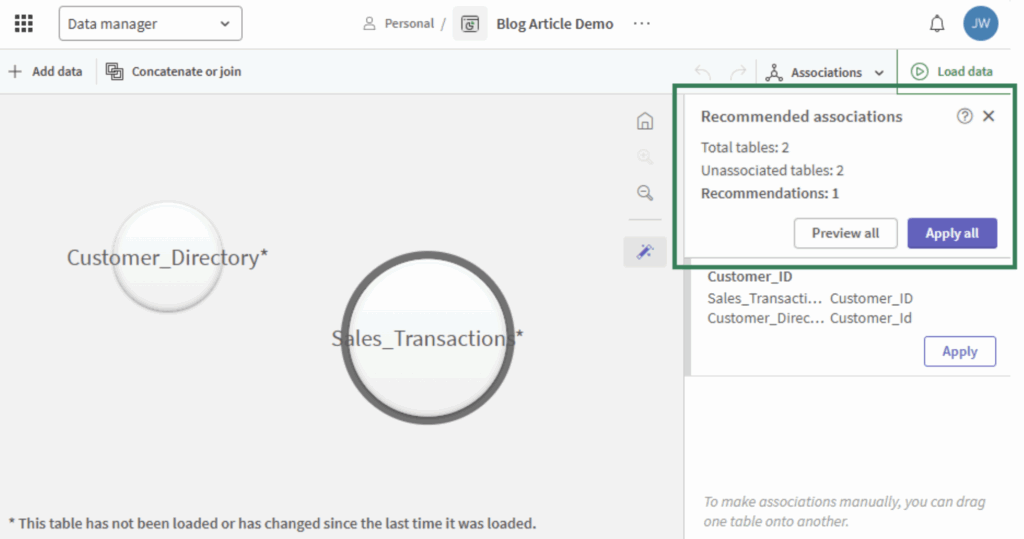
The developer doesn’t need to write a single line of code to join these two tables, simply click “Apply all” on the recommended associations panel, or physically drag one table bubble and drop it on the other table bubble to form a clean, optimized relationship.
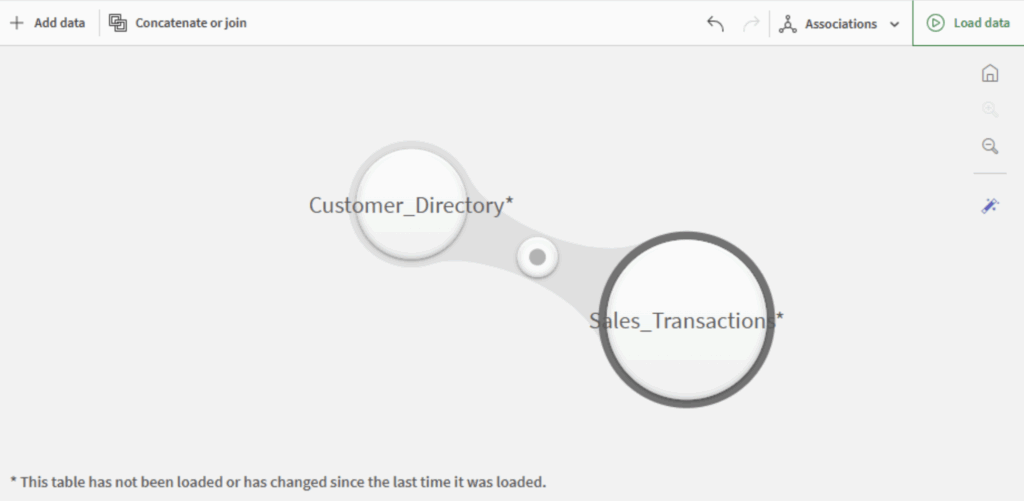
Of course, you should always confirm that the recommended relationships are in fact valid business relationships.
Data quality is the ultimate foundation of any successful BI initiative. Building dashboards on top of unverified dirty data will inevitably lead to incorrect metrics and broken logic landing on executive desks. This could easily prove to be a fatal error for your organizations BI project. Qlik Sense’s Data Manager provides the easy solution, serving as an early warning system, allowing the developers to visually profile, inspect, and handle flaws structural issues before the data reaches the visualization sheet.

Jeremiah Willett, CDMP: Empowering Smarter Decisions with Data
He is an Associate Manager of Data Engineering at Data Principles, where he helps organizations turn complex data into clear, actionable insights through innovative business intelligence solutions. With experience across SQL, Qlik Sense, data integration, and project management, he is passionate about empowering organizations to make data-driven decisions. Jeremiah also serves as the Vice President of Finance for DAMA Phoenix and holds a Certified Data Management Professional (CDMP) credential.
Join Our Data Community
At Data Principles, we believe in making data powerful and accessible. Get monthly insights, practical advice, and company updates delivered straight to your inbox. Subscribe and be part of the journey!